Linux Memory Management?
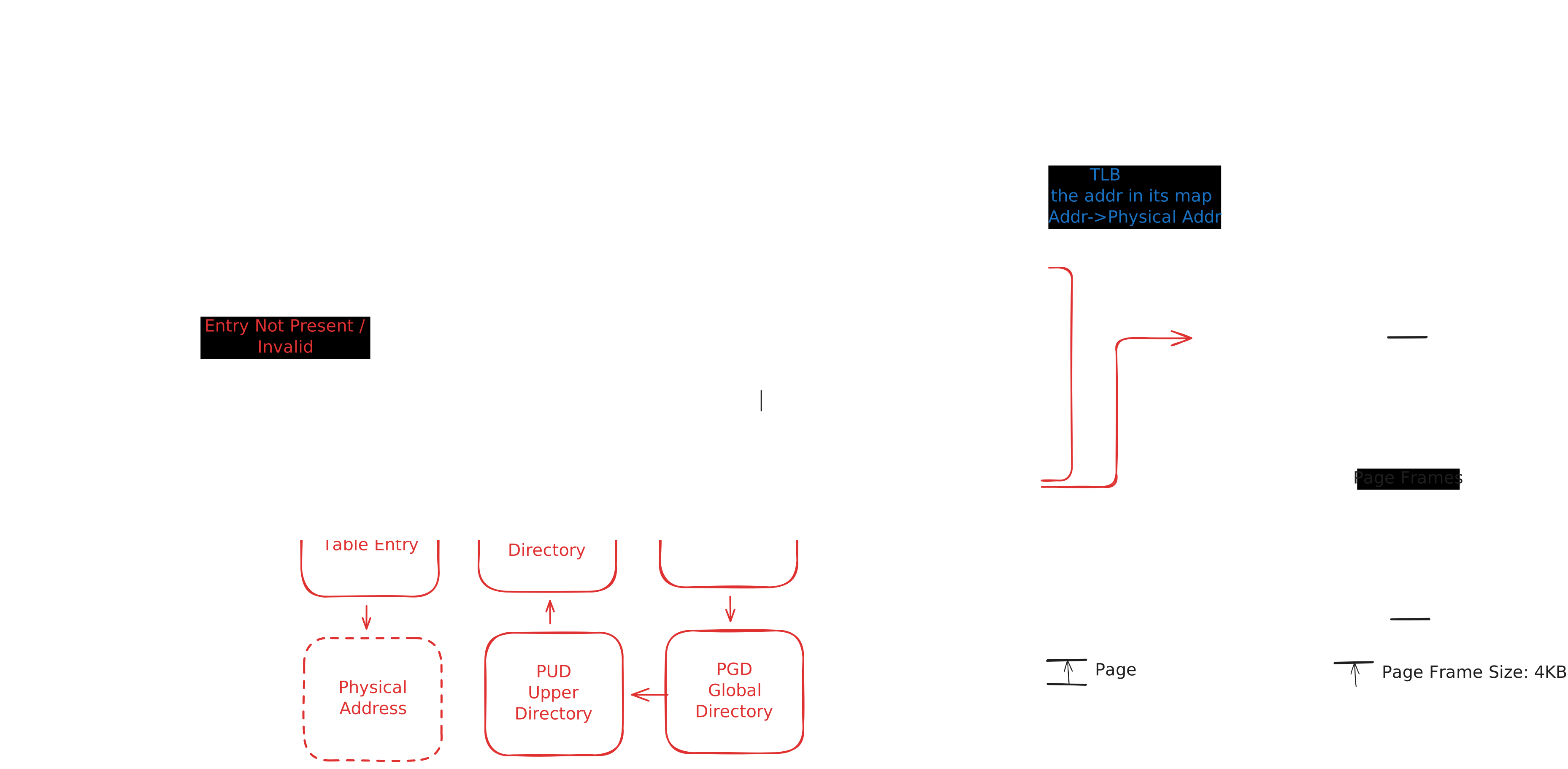
Memory Management Unit
Its main task is to retrieve the value requested by the CPU using a virtual address. The CPU does not know what the heck this "int hello = 30" physical address is.
CPU: "Oi mate toss me this value right now 0xFxx !"
MMU: "Yes, let me ask my bruv!"
MMU: "Oi mate, have you got 0xFxx's virtual address from before? I hope the TLB has got it, 'cause walking the page table is too long and costly :/"
Yeah, if the TLB provides the physical address, the MMU accesses physical memory directly. Otherwise (a TLB Miss), the Hardware Page Table Walker starts to search the page tables. If it finds the address, the TLB is updated automatically. If the hardware detects an issue (page not present, permission violation, write to read-only page, COW trigger, etc.), the Kernel Page Fault Handler is triggered.
As you can see, these types of frequent processes should be as fast as possible, and specialized hardware-level units take care of retrieving values from memory.
Virtual Memory
Virtual memory lives up to its name. It provides virtual memory management functionality. The functionalities are:
- Isolation: Every running application has its own swamp. No one can enter; no one can live in another's space. Every app thinks, "The whole memory is mine."
- Simplicity: Physical memory is assembled by randomly located memory blocks. Virtual memory provides sequential, clean memory blocks.
- Efficiency: The virtual memory abstraction allows user processes to operate without knowing the details of physical memory management: whether the OS swapped data to disk, allocated physical memory, or changed physical addresses. The VM subsystem handles all this complexity transparently.
Physical Memory
Its name is Random Access Memory (Yes, I'm listening to Daft Punk at the moment, and yes, I'm asking the same question). It has a limited size, and data is ephemeral in memory.
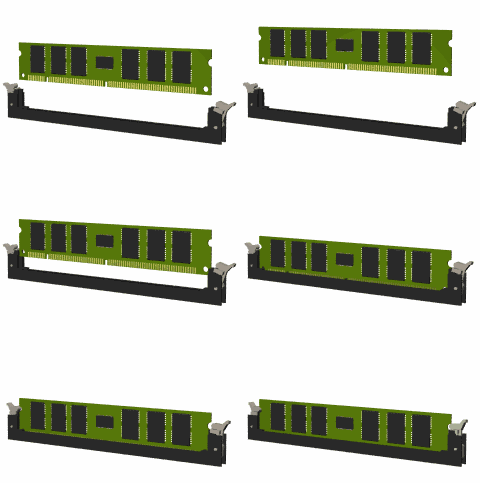
DMA Direct Memory Access
Although not directly relevant to our main topic, I want to briefly touch upon this. Hardware components (graphics card, network card, disk, etc.) essentially read from and write to RAM without burdening the CPU. The DMA controller receives a command from the CPU to transfer data and triggers an interrupt upon completion. The read flow functions similarly to the write flow. In cases of fragmented RAM, DMA uses a scatter-gather mechanism to manage data via the scatterlist structure.
Speaking of DMA and efficiency, it is worth mentioning Kafka as a side note, since it heavily relies on these mechanisms (Zero Copy) for performance.
What is the Page?
A page is a fixed size contiguous block of virtual memory that the MMU maps to a physical frame. Default page size in x86_64 architecture 4KB.
Physical address: 0x100000 -> 0x100FFF No metadata inside the page itself.
What does include it inside the page?
Raw bytes int x = 5 -> 00 00 00 05
Where is the metadata of Page?
Located in mem_map[] array
struct page
in kernel
struct page {
   flags      -> PG_locked, PG_dirty, PG_uptodate, PG_swapbacked, PG_reserved, PG_lru, PG_active (bit flags)
   _refcount  -> atomic usage count (0 = freeable)
   _mapcount  -> number of page table entries mapping this page
   mapping    -> pointer to address_space (file) or anon_vma (anonymous memory)
   index      -> offset inside backing object (file page index or anon virtual offset)
   lru        -> list node used by page reclaim (active/inactive LRU lists)
}
// Note: In modern kernels (5.16+), many of these fields are being moved to struct folio
What does index mean in struct page?
If it's addressed to a file-backed page (page-cache):
index = page offset inside file
Example:
PAGE_SIZE = 4KB
File offset = 8192 bytes
index = 8192 / 4096 = 2

File layout:

Page 0 -> bytes 0 - 4095
Page 1 -> bytes 4096 - 8191
Page 2 -> bytes 8192 - 12287  ← index = 2

index -> file offset in PAGE units (page cache index)
If it's addressed to Anonymous memory (heap/stack):
index = virtual page offset inside VMA (virtual offset in anon mapping)
If it's addressed to Swap-backed pages:
index may encode swap entry offset (logical offset of page inside its backing object)
Physical RAM: Page Data <- actual bytes
Kernel Memory: struct page *object <- metadata
Page Frame
Important distinction: A page is a virtual memory concept (4KB block in virtual address space), while a page frame is a physical memory concept (4KB block in RAM). The page table maps virtual pages to physical page frames.
Page frames are represented with PFN (Page Frame Number):
PFN = 1024
Physical Address = PFN << PAGE_SHIFT
// PAGE_SHIFT = 12 for 4KB pages
// Physical Address = 1024 << 12 = 0x400000 (4MB)
Page Table
It is the translation table from virtual address to physical address.
Virtual Address → Page Table → Physical Frame
It contains page table entries with PFN (Page Frame Number) and permission bits:
Permission bits:
| Bit | Meaning |
|---|---|
| R | Read |
| W | Write |
| X | Execute |
| U/S | User/Kernel |
| NX | No Execute |
State bits:
| Bit | Meaning |
|---|---|
| Present | Is it in RAM? |
| Dirty | Written |
| Accessed | Read |
| Swapped | Is it in Disk? |
Where is it stored?
- For every process:
mm_struct → pgd - CPU register: CR3 holds the active page table address
- Every context switch changes the CR3 address
Page Cache
The Page Cache aims to reduce disk I/O by caching file blocks in RAM.
- Backing: File system/disk
- Storage: RAM as page blocks (default size 4 KB)
- Management: Kernel (page cache subsystem + file system)
- Write Policy: Write-back or write-through
- Eviction Policy: Managed via LRU lists or in response to memory pressure
Every page in the cache is represented by a struct page, so the management is consistent with what we have learned about struct page elsewhere.
Why am I curious about it? For example, Kafka uses page cache extensively. Let's try to understand it better.
struct page {
   mapping -> points to address_space (file)
   index   -> page offset in file
   flags   -> PG_dirty, PG_uptodate ...
   lru     -> links to active/inactive LRU lists
}

READ:
Process read("file.txt") -> VFS lookup page in page cache -> TRUE: return data from cache, FALSE: read data from disk -> store in page cache -> return data
WRITE:
Process write("file.txt") -> Update page in page cache -> Mark PG_dirty -> Later, flush to disk (write-back)
Kafka producer: write(message) -> file descriptor -> kernel page cache -> fdisk by OS later
Kafka consumer: read(offset) -> page cache lookup -> hit return , miss read disk
TLB
The TLB is a cache that located in the MMU. It stores recent virtual-physical memory address tuples as a map. The TLB's overall performance tremendously affects the whole system. If a question mark has already appeared on top of your head, hold your horses; we will get there.
How many type of TLB that we have?
ITLB: Instruction TLB
ITLB: Data TLB
TLB Lookup
The MMU looks up virtual memory addresses in the TLB.
TLB Hit
If a virtual memory address is found in the TLB, it returns the physical address (within 1 or 2 CPU cycles), and memory access happens.
TLB Miss
If the memory address does not exist in the TLB, the MMU starts the page table walk. It adds the virtual-physical address tuple to the TLB after the page table walk. If the MMU cannot find the virtual address in the page tables, the MMU creates a Page Fault interrupt; then, the kernel takes care of it from now on.
There are different type of TLB miss, Cold Miss(TLB empty or entry never cached before), Capacity Miss(Old entries discarded for new entries), Conflict Miss
TLB Flushing
TLB flushing occurs when the page table changes but the TLB still contains stale mappings.
Don't think in this mentality, this is not a traditional application level caching. TLB entries are frequently evicted and reloaded due to context switches, address space changes, and memory management operations. That means okay TLB filled with some values, and they will live for good. No!
Every Context switch(new process running on CPU) can change CR3, CR3 points different page table address.
This CR3 change invalidates previous address space mappings. Subsequent memory accesses cause TLB misses and trigger page table walks to refill entries lazily.
What else causes TLB Flushing:
- munmap, mprotect, brk: Memory map changed
- Page migration or compaction: Physical frame relocation
- COW: New page created
- Kernel page table update: Global TLB invalidate
Btw, TLB flush operations are highly costly.
To mitigate to this type of costly process, there is some optimizations:
PCID
Process Context ID: (Virtual Page, PCID) -> Physical Frame
ASID(ARM, RISC-V)
Address Space ID: (Virtual Page, ASID) -> Physical Frame
How does it work in x86_64 architecture?
CR3 = (PGD address) + (Process ID tag)
Let's look at the context switch example:
without PCID:
CR3 changes -> TLB FLUSH
with PCID:
CR3 changes -> keep TLB as is -> CPU chooses correct entry with PCID.
How the kernel handles it:
Every mm_struct has PCID/ASID, with PCID/ASID enabled, the CPU can keep TLB entries from multiple address spaces simultaneously, reducing the need for full TLB flushes during context switches.
See, context switch dramatically reduced.
There is one exceptional case if the kernel page table changes, it requires Global TLB shootdown. Otherwise, kernel global mappings are not flushed on normal context switches.
TLB Shootdown
If your system has multicore architecture, we face this term. Basically, if a CPU changes its page table (and TLB automatically), then it yells to other cores to remap their own TLBs.
CPU0 changed mapping!
CPU1 and CPU2 still stores stale entries in their own TLB mappings.
They have to be executed(with gyotin, just kidding we dont do anymore) invalidate!
Why we're invalidating, because same process can run on different cpus at the same time(Hello my old friend Parallelism)
Thread A -> CPU0
Thread B -> CPU1
Shootdown Process
CPU0 page table updated.
Send Inter-Processor Interrupt(IPI)
Other cpus get the interrupt
Run invlpg / flush_tlb_range
Send ACK
Shootdown Types
- Local in its own CPU: invlpg
- Other CPUs: IPI + remote invalidate
- If Kernel mapping changes: Global Shootdown - All CPUs, all address spaces
Page Table Hierarchy
| Level | Name | Description | Index Bits 4-Level |
|---|---|---|---|
| L4 | PGD - PAGE GLOBAL DIRECTORY | The root-level directory. Every process's mm_struct stores the PGD address. The CR3 register points to it. | 39-47(9 bit) |
| L3 | PUD - PAGE UPPER DIRECTORY | The next-level directory after the PGD. If huge pages are activated (1GB), you would find what you are seeking at this level. | 30-38(9 bit) |
| L2 | PMD - PAGE MIDDLE DIRECTORY | The next-level directory after the PUD. If huge pages are activated (2MB), you would find what you are seeking at this level. | 21-29(9 bit) |
| L1 | PTE - PAGE TABLE ENTRY | This is the bottom level. It stores the 4KB physical page frame address. | 21-29(9 bit) |
p4d, p4d_t, p4dval_t = The Page Level 4 Directory was introduced to handle 5-level page tables after the PUD was introduced.
Modern architectures have 5-level page tables, and the bit-range increased to 57 with p4d. Kernel Doc
If you ask yourself, "What does 48-bit or 57-bit mean?" In x86_64 architecture, virtual address spaces must be in the form of a Canonical Address. This rule says unused bits must be the same as the last used bit value. The values of bits 48 through 63 will be the same as the 47th bit's value.
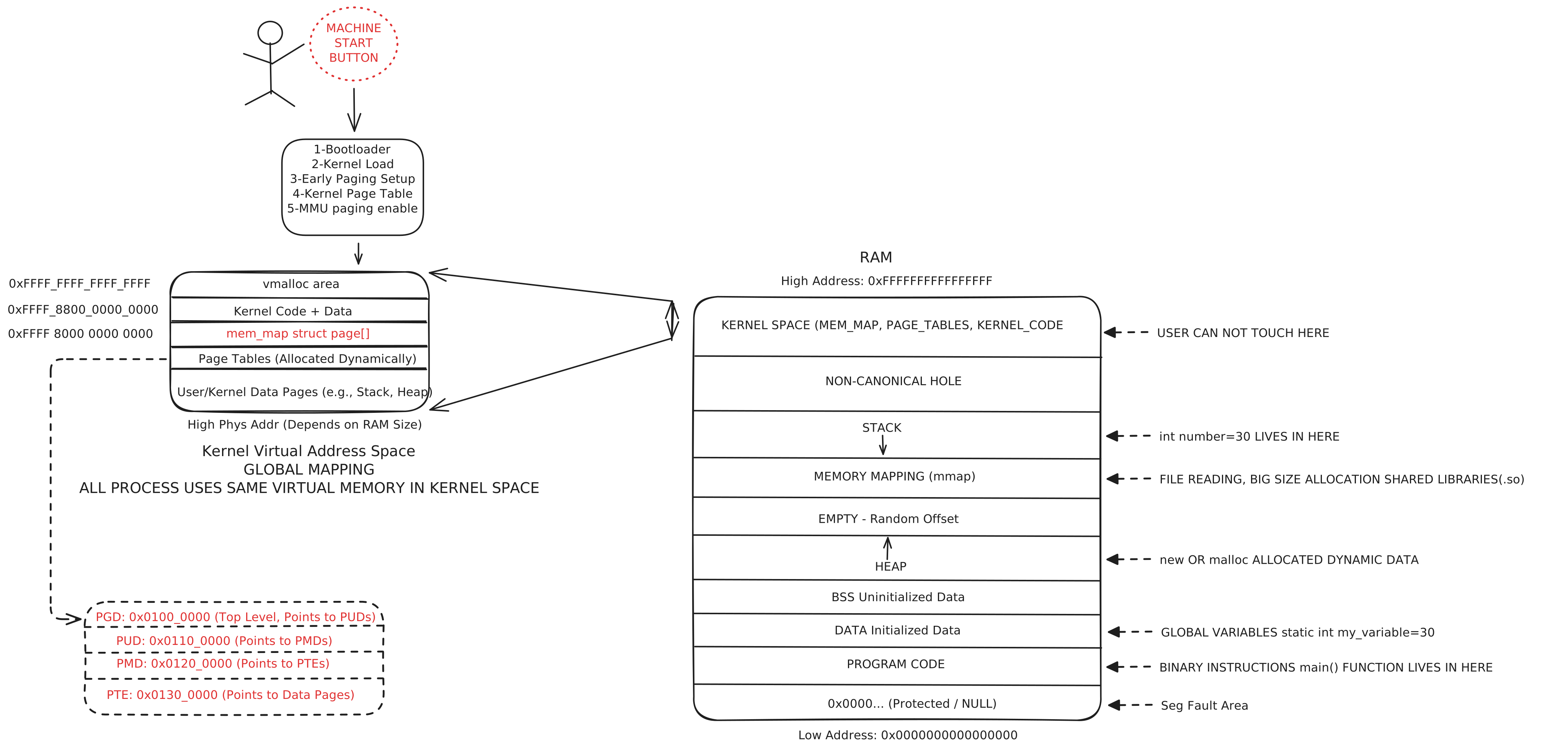
User Space
0x0000000000000000 - 0x00007FFFFFFFFFFF
Between these two areas is the bottom area
(128TB). User processes and libraries' heap/stack live in this area.
Non Canonical
0x0000800000000000 - 0xFFFF7FFFFFFFFFFF
This area is protected by a General
Protection Fault. This is the 48->63 bits range!
Kernel Space
0xFFFF800000000000 - 0xFFFFFFFFFFFFFFFF
Between these two areas is the top area
(128TB). The kernel, modules, and direct map live in this area.
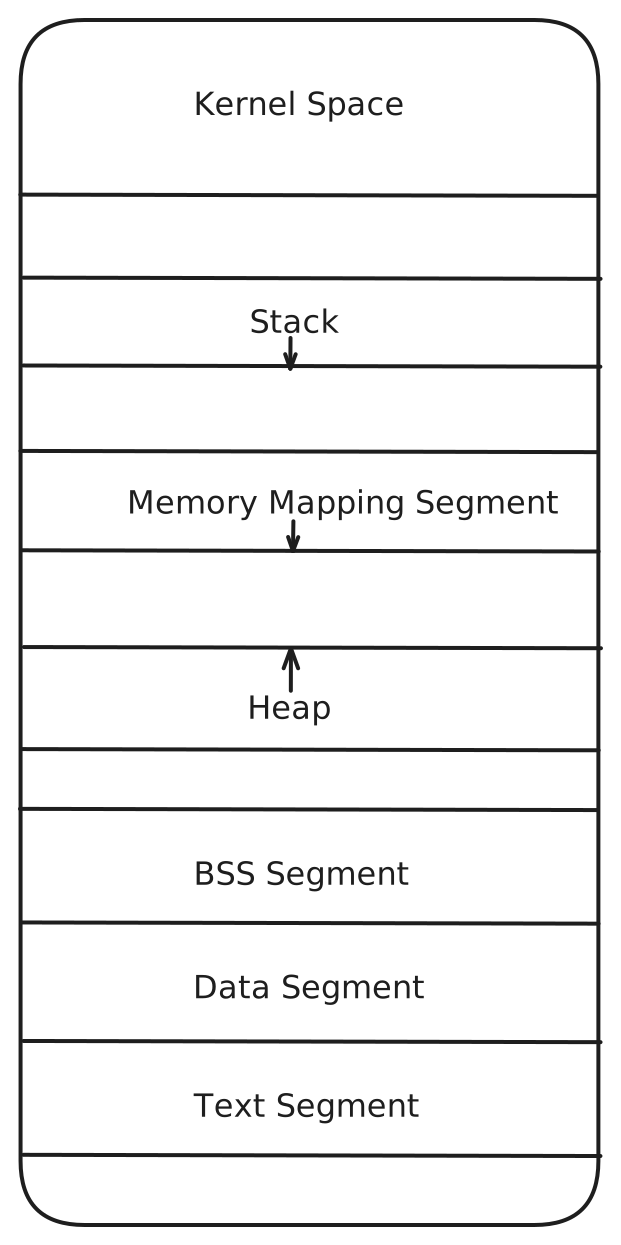
Process Memory Layout
- Text Segment
- It contains machine code and read-only executable (RX) content. If more than one process runs it, the physical pages are shared by them.
- Data Segment
- Initialized global and static variables.
static int lucky_number = 34; - BSS Segment (Block Started by Symbol)
- It stores uninitialized variables. It does not allocate space on disk; it is unassigned (zeroed)
during boot loading.
static char *lucky_word - Heap
- It is used by the dynamic memory allocator (malloc). It grows in the address space from bottom
to top. It is adjusted by
brk()andsbrk()system calls. - Memory Mapping Segment
mmap()memory-mapped files and shared libraries (.so) are loaded into this segment area. Generally, it is located between the Heap and the Stack.- Stack
- Function calls, local variables, and return types are stored here. It grows in the address space from top to bottom. It is protected against overflows with a "Guard Page".
Demand Paging
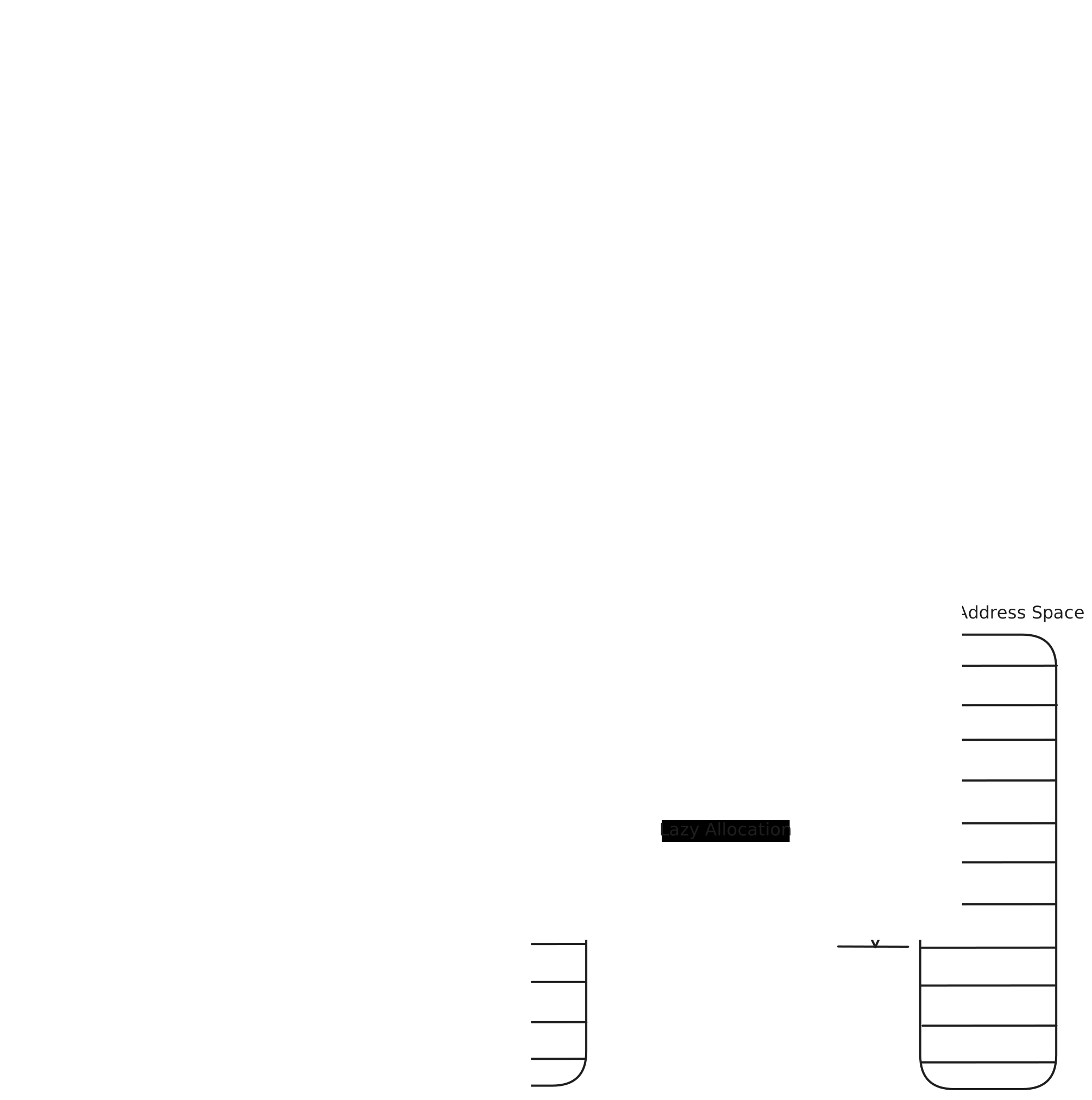
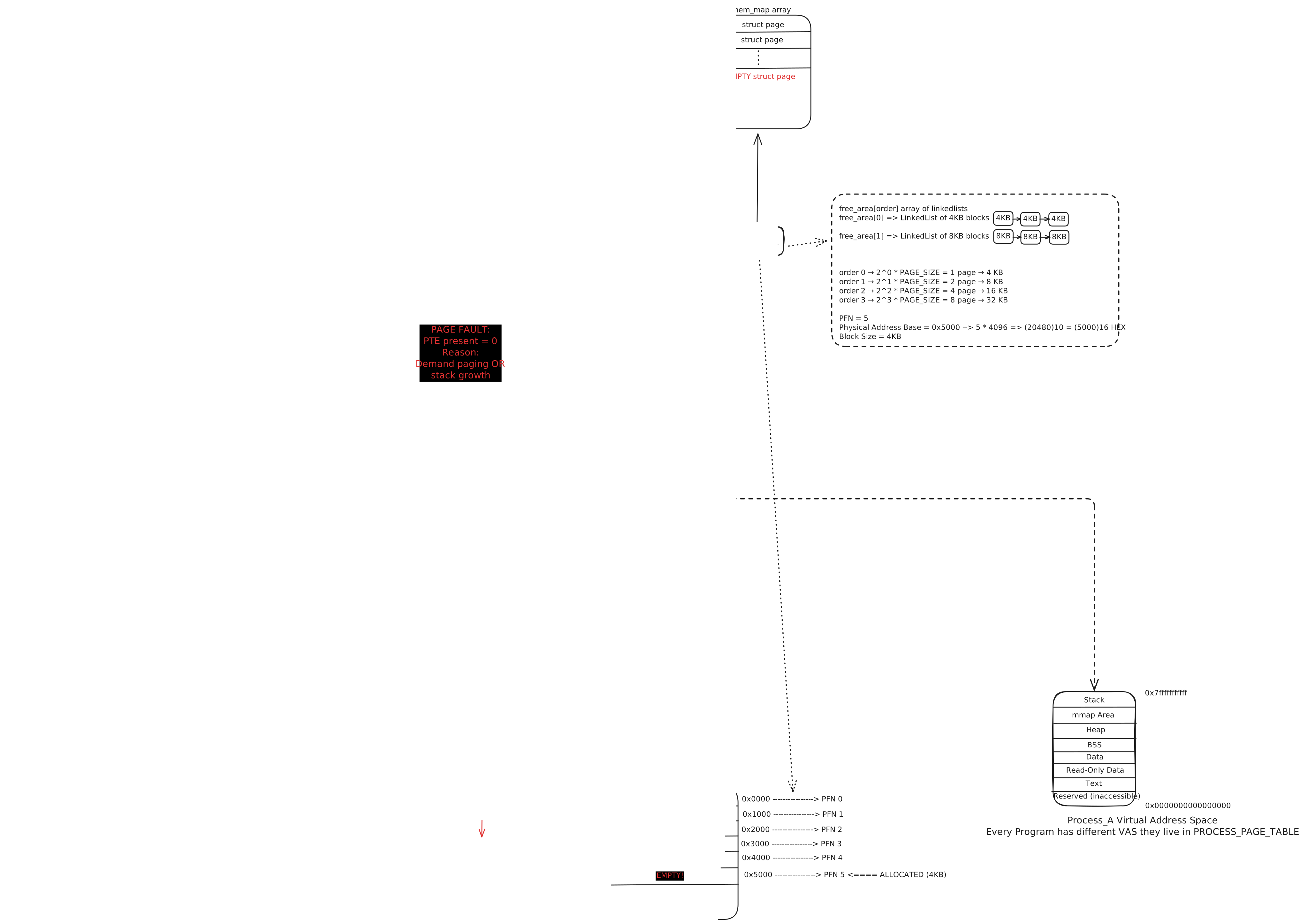
Lazy Allocation and Demand Paging -> If an application requests a large memory block, the kernel will not directly allocate a piece of physical memory. Instead, it signs (marks) the virtual memory pages. When the application starts to write to this block, a page fault occurs. At this point, the kernel allocates the needed physical page frames (Demand Paging). This prevents the waste of RAM if it hasn't been used yet.
Copy-on-Write (COW)
When a fork() system call starts a new process, the parent process's entire memory is not copied. The pages (Virtual Memory) are copied, and all of them are flagged as Read-Only. If the forked process or the parent process tries to write to these pages, the CPU creates a Write Protection Fault. The kernel catches this fault and then creates physical addresses for those pages. The flags are set to RW (Read/Write), and then the process is released.
Basic Memory Protections
- _PAGE_PRESENT: This flag indicates whether the page exists. If the flag is 0, a Page Fault occurs.
- _PAGE_RW: 1 is writable, 0 is read-only. If a read-only page is accessed for writing, a Page Fault occurs.
- _PAGE_USER: 1 is user mode accessible (Ring 3), 0 is kernel mode accessible (Ring 0).
- _PAGE_NX: If this flag is set, the CPU will not execute instructions. This protects against buffer overflow attacks (Data Execution Prevention).
Huge Pages vs Transparent Huge Pages (THP)
Standard 4KB page sizes are not efficient if we are talking about some database systems (for example, an Oracle heap space could be 100GB). 100GB is ~25,000,000 4KB page blocks. This number of PTEs won't fit in the TLB, and TLB misses occur continuously.
Huge Pages
If we use huge pages (in x86_64, 2MB or 1GB), one TLB entry stores a huge amount of space. It significantly reduces the chance of a TLB miss. It would be used via hugetlbfs or mmap flags.
Transparent Huge Pages (THP)
Without being set beforehand, the kernel uses khugepaged to assemble 4KB pages into 2MB pages in the background. If there is memory fragmentation, the kernel spends more effort than usual during Memory Compaction. This causes latency spikes.
| Feature | Advantages | Disadvantages |
|---|---|---|
| Performance | Reduces TLB miss rate, lowers CPU overhead | May cause CPU spikes during allocation (compaction) |
| Usage | Does not require application changes (transparent) | Unnecessary cost for short-lived processes (allocation overhead) |
| Memory | Reduces page table size (fewer PTEs) | Risk of internal fragmentation (unused gaps) |
Memory Folios
The struct page represents 4KB (Simple Pages) and 2MB (Compound Pages) pages. The kernel had to check continuously whether it is a tail page or a head page. These checks always create extra overheads.
The struct folio guarantees that if a page is a folio, it is the head page. File systems and the Page Cache use it.
Out of Memory OOM Killer
If there is no memory or swap area, the kernel murders a process... Put a gun against his head, pulled my trigger, now he's dead!
The intention was good; don't jeer, don't blame it! Otherwise, the whole system would crash.
- OOM Score: The kernel numerates (badness score) the processes; if a process has high memory usage, the badness score will be high.
- OOM Score Adjustment: Administrators can protect critical processes by setting
/proc/[pid]/oom_score_adjto negative values (-1000 to disable OOM killing for that process) or make processes more likely to be killed with positive values. - PSI (Pressure Stall Information):If high pressure on ram(trashing) and system exceeded to unusable point it triggers OOM Killer.
- In Kubernetes, we can manage pods and processes' OOM killing strategies with
memory.oom.group.
What happens when I initialize a variable?
If I jump into Linux with generalized, expressive words like "OS internals," I cannot understand correctly without seeing the whole map (maybe that is why I have always hated Age of Empires' map exploration mode). A bird's-eye look at the end-to-end process gives me more insight and knowledge. So, I have always liked "What happens when I enter google.com into the browser?" type questions. Now, we are going to dig down from the ground.
If a page fault does not require to disc access(new physical memory space for anonymous pages) that we call Minor Fault. If a page fault requires to disc access that we call Major Fault.
int *ptr = malloc(sizeof(int));
*ptr = 30;
malloc(sizeof(int));
-
User Space
Glibc (a C library): It checks if there is any space in its memory pool. If there is not enough space, it requests new memory space from the kernel.
-
System Call
Glibc calls brk() to expand the heap memory space or mmap() (to create an anonymous memory map).
-
Kernel Space
The sys_brk or sys_mmap function receives requests.
- No physical memory space is allocated yet!
- The kernel adds a new record/node to the VMA list. This record stores: "This virtual address (e.g., 0x7f...1000) belongs to this process, and it has privileges to read/write." vm_area_struct
- Page tables (PTE) are still empty, or the "Present Bit" is set to 0.
First Access and TLB Miss
*ptr = 30;
-
CPU Pipeline
The CPU requests a store instruction: write the value 30 to the ptr variable's virtual address (0x12345000).
-
MMU ve TLB
The MMU asks the TLB for the physical address of this new value, but unfortunately, there is no record.
-
Page Walk
The MMU calls the 'page table walker' to seek this value's virtual address using the CR3 register. Please look at the steps of the Page Table Walker!
-
Absent PTE
When it finds the PTE, the MMU will see that the page table's physical address is empty or the Present Bit is 0. The hardware stops the process, then creates a Page Fault (Exception Vector 14).
Page Fault Handling
The CPU changes its space from user (RING 3) to kernel (RING 0) mode, then calls the do_page_fault() function. The fault address is in the CR2 register.
-
Context Check
Did the error code occur in Kernel Mode? (It could be a Kernel bug or vmalloc). In our case, it is User Mode!
-
VMA Check find_vma
Is the Faulted Address in the process's valid memory spaces (in the VMA)?
No: Segmentation Fault (SIGSEGV). Program crashes.
Yes: Are the access privileges (R/W/X) compatible with the VMA? Is the VMA writable? -
Fault Type Check handle_mm_fault
Anonymous Fault: The memory was requested with malloc, but it is still not created yet. (This is our case).
File-backed Fault: The memory belongs to a file (code or mmaped file), and it should be read from the disk.
Swap Entry: The page was used before, but it has been swapped to disk.
Physical Frame Allocation
Anonymous Fault
-
Buddy Allocator
The kernel requests an empty physical Zero Page (a page that is filled with zeros) or a new page via the alloc_pages function.
-
PTE Update
The allocated physical memory address (PFN Physical Frame Number) will be written to the PTE. The bits are set -> PAGE_PRESENT=1, _PAGE_RW=1, _PAGE_USER=1, _PAGE_ACCESSED=1, _PAGE_DIRTY=1 (Write process).
-
Return
The kernel returns with the iret command to user space; the store instruction runs again.
Overall Flow
Data Written to Memory
CPU tries to write this value via the MMU
Despite the TLB Miss, the page walk is going to find a valid physical address. The data is going to
be written to the physical address (RAM).
Data Types
Integer 30: A 32-bit (4-byte) number. The x86_64 architecture uses 'Little Endian'; it stores it in
memory like 1E 00 00 00 (hex).
Double 33.7: 64-bit float
Stores as a char array: H, e, l, l, o, \0.
The kernel cannot read a string in user space. User space's memory might be swapped, or a malicious pointer might try to access it. The kernel uses functions like strncpy_from_user() that are going to copy data to kernel space. SMAP (Supervisor Mode Access Prevention) prevents accidental access to user space.
Swapping
If there is Memory Pressure, it triggers kswapd. It starts to search for pages signed as inactive and idle in the LRU lists.
Pageout
-
Anonymous Page
Data (our example, 30) is going to be written to swap space. The Present Bit is set to 0 in the PTE. The PTE would not be completely emptied because if we need it again, we need an address to find it on the disk. That is the Swap Offset; it stores where the value is on the disk.
-
File-backed Page
If the page is "Dirty," it means it has changed; it is going to be written to the original file with fsync. If the page is "Clean," it is removed from RAM because the file can be read again.
Pagein
-
If the program accesses ptr (it is our variable in the program print("%d", &ptr)), Present=0, and a Page Fault occurs.
-
The kernel reads the 'disk offset' in the PTE.
-
Disk I/O runs; the process sleeps in TASK_UNINTERRUPTIBLE mode.
-
If the data exists in RAM, it updates the PTE. The data access process (&ptr) continues.
What is the mm_struct
It stores the process's PGD (Page Global Directory) address. This is the address loaded into the CR3 register during a context switch. Additionally, it stores the mmap_sem (or, in modern kernels, mmap_lock) read-write lock.
struct rw_semaphore mmap_lock; Linux Kernel Code
What is the vm_area_struct
If the pages are sequential and have the same privileges, every such page constitutes a VMA in Virtual Memory Space. For instance, a DB process would have thousands of VMAs.
Allocators
Buddy Allocator
It is the main memory manager; it divides memory into blocks (Orders) that are powers of 2^n.
Order 0 (4KB), Order 1 (8KB)... Order 9 (2MB)
Note: As of kernel 6.2+, MAX_ORDER is 10 (not 11), meaning max single allocation is 2^9 pages = 2MB.
If 12KB of memory is requested (3 pages, because remember, the page's default size is 4KB), the system rounds up to 16KB (Order 2). If there is no empty 16KB block, a 32KB block (Order 3) is divided by 2 (Buddies separated :/).
Coalescing: If the memory is freed and the buddy memory is also free, they are coalesced and moved to an upper-level block.
The problem is internal fragmentation; if we need 5KB, then 8KB will be allocated. 3KB is a waste of memory.
Slab Allocator
The Buddy Allocator's granular (4KB) approach is not efficient for smaller kernel objects (dentry, inode, task_struct). The Slab allocator allocates bigger pages from the Buddy Allocator, then slices them into smaller parts (slabs).
- SLAB is Legacy at the moment.
- SLUB (Unqueued Slab Allocator) is the default modern allocator. It works efficiently with metadata management and CPU-Local cache in multicore systems.
- SLOB is lightweight solution for embedded systems.
kmalloc() function calls use SLUB. Frequently used objects are cached (e.g., kmalloc-32, kmalloc-64). It enhances the efficiency of L1/L2 cache memory.
Buddy vs. Slab Allocator
| Feature | Buddy Allocator | Slab (SLUB) Allocator |
|---|---|---|
| Allocation Unit | Page (4 KB and multiples) | Object (Byte-level) |
| Purpose | Large, physically contiguous memory regions | Small, frequently used kernel objects |
| API | alloc_pages, get_free_page |
kmalloc, kmem_cache_alloc |
| Fragmentation | Solves external fragmentation, causes internal fragmentation | Minimises internal fragmentation |
LRU
If the RAM is full, which part should be taken out? Eviction policies rule this question's answer.
Linux has been using an Active List and an Inactive List for many years. If the pages are accessed (the Accessed bit), they are moved to the Active List. If the access frequency ends, pages move to the Inactive List and are then dropped from this list.
This approach has not been sufficient for working with large working sets like databases. It causes Thrashing (dense I/O).
MGLRU
It was released in kernel 6.1. Pages are separated into generations, not only into two lists. Aha! Is it familiar to Java developers? I am going to scrutinise GCs in another blog post.
It traverses page tables, then creates young generations.
It is proved that it uses less CPU and causes fewer OOMs.
Hidden Costs
TLB Miss
If there is a TLB Miss;
- The CPU stops,
- The Page Walk starts.
Page walks might take ~50 cycles in L3, and if in main memory, ~200-300 cycles. If the memory is larger, the page walk cost will increase in parallel.
NUMA (Non-Uniform Memory Access)
In multicore servers, a CPU can access local caches (L1, L2, L3) faster (20-50%) than remote memory
from other nodes. Linux AutoNUMA (when enabled via numa_balancing) uses page faults to
track access patterns and migrates pages to local nodes. However, this can sometimes cause a
"ping-pong" effect if threads migrate between nodes frequently.
Page Overhead
Kernel allocates 64 byte for every 4KB struct page, this space stores flags and reference counter.
Lets some math here;
16 GB = 16 × 1024 × 1024 × 1024 = 17,179,869,184 byte
17,179,869,184 / 4096 = 4,194,304 pages
4,194,304 × 64 = 268,435,456 bytes
268,435,456 ÷ 1024 = 262,144 KB
262,144 ÷ 1024 = 256 MB
256 ÷ 1024 = 0.25 GB
256 MB ÷ 16384 MB ≈ 0.0156 = %1.56
What the heck is little-big endian?
It began upon the following occasion. It is allowed on all hands, that the primitive way of breaking eggs before we eat them, was upon the larger end: but his present Majesty's grandfather, while he was a boy, going to eat an egg, and breaking it according to the ancient practice, happened to cut one of his fingers. Whereupon the Emperor his father published an edict, commanding all his subjects, upon great penalties, to break the smaller end of their eggs. The people so highly resented this law, that our Histories tell us there have been six rebellions raised on that account, wherein one Emperor lost his life, and another his crown. These civil commotions were constantly formented by the monarchs of Blefuscu, and when they were quelled, the exiles always fled for refuge to that Empire. It is computed, that eleven thousand persons have, at several times, suffered death, rather than submit to break their eggs at the smaller end. Many hundred large volums have been published upon this controversy: but the books of the Big-Endians have been long forbidden, and the whole party rendered incapable by law of holding employments. During the course of these troubles, the emperors of Blefuscu did frequently expostulate by their ambassadors, accusing us of making a schism in religion, by offending against a fundamental doctrine of our great prophet Lustrog, in the fifty-fourth chapter of the Brundecral (which is their Alcoran). This, however, is thought to be a mere strain upon the text: for their words are these; That all true believers shall break their eggs at the convenient end: and which is the convenient end, seems, in my humble opinion, to be left to every man's conscience, or at least in the power of the chief magistrate to determine.The Origin of the Terms Big-Endian and Little-Endian
It determines how we store multibyte numbers in memory.
Little-endian: Least Significant Byte(LSB)
Big-endian: Most Significant Byte(MSB)
Little-endian -> 0x78 0x56 0x34 0x12
Big-endian -> 0x12 0x34 0x56 0x78
x86 (Intel, AMD) Little-endian
Network protocols (TCP/IP) Big-endian
Little-endian CPU: Processes the least significant byte first (efficient for addition).
Big-endian CPU: Stores the most significant byte first (more readable for humans).
Examples: TCP/IP: Big-endian and if your cpu little-endian(most probably yes) we have to convert to big-endian.
var buf [4]byte
binary.BigEndian.PutUint32(buf[:], 0x12345678)
Decimal : 1234
HEX : 0x000004D2

value := binary.BigEndian.Uint32(data)
fmt.Println(value)  // Output: 1234

value := binary.LittleEndian.Uint32(data)
fmt.Println(value)  // Output: 0xD2040000 -> 3523477504
Big-endian
HEX : 0x000004D2
0x00 = 0
0x00 = 0
0x04 = 4
0xD2 = 13 * 16ˆ1 + 2 * 16ˆ0 = 210

value = 0x00 * 256ˆ3 + 0x00 * 256ˆ2 + 0x04 * 256ˆ1 + 0xD2 * 256ˆ0 = 1234
Little-endian
HEX : 0x000004D2
0x00 = 0
0x00 = 0
0x04 = 4
0xD2 = 13 * 16ˆ1 + 2 * 16ˆ0 = 210

value = 0x00 * 256ˆ0 + 0x00 * 256ˆ1 + 0x04 * 256ˆ2 + 0xD2 * 256ˆ3 = 3523477504
Why 256?
A byte 8 bit
1 byte can be in 0-255 range as a decimal
2ˆ8 = 256 -> 1 bytes base is 256
Okay lets look at a sample problem... Just for fun
Social Network Class Scene with bizarre motivation music :) or Low quality unmotivating version and StackOverflow QuestionLet's answer these questions;
How many pages are there?Virtual address size = 16 bit
Page size = 256 bytes
Page table = single level
2^16 = 65536 bytes = 64 KB virtual address space
Page size = 256 bytes = 2^8
Number of pages = Virtual address space / Page size
65536 / 256 = 256 pages
Virtual address bits: 16
Offset bits: 8   (256 = 2^8)
Remaining bits = page number bits
16 - 8 = 8 bits
2^8 = 256 pages
256 pages => 256 PTE
Virtual = 64 KB
Page size = 256 B
64 KB / 256 B = 256 frames => 2ˆ8 => 8 bit PFN

FRAME NUMBER 8 BIT
STATE BITS 8 BIT

256 entries × 2 bytes = 512 bytes pte